01 FREE AND OPEN · STRUCTURAL ANALYSIS

Structural analysis, in a browser tab.

A free and open structural-analysis platform with three modes: Basic, which works today, plus Education and PRO, both still in development. The solver runs in your browser, on your own machine.

Read our blog
  • BasicAvailable today
  • EducationIn development
  • PROIn development
No install. No licence key. No account.
Open source · AGPL-3.0
Built in Argentina · FIUBA · Lambda Class
A unit load moving across a six-panel Pratt deck trussSimply supported six-panel Pratt truss: pinned at the left deck node, roller at the right. A single downward unit load travels along the deck; between panel points it is split linearly between the two adjacent nodes, so the total load is always one. Members are coloured by the solved axial force (red in tension, blue in compression, grey when the force is near zero), on one fixed scale shared by every position. The grey outline is the undeformed truss; the deflected shape is normalised for legibility.
TENSION + COMPRESSION − NEAR ZERO ≈0 UNDEFORMED DEFORMED SHAPE · NORMALISED

02 THE PROBLEM

For decades, structural analysis has depended on software that is
expensive, closed and tied to a desktop.

Thousands of USD
Where the dominant tools publish a price at all, one seat runs into the thousands per year. A real barrier for small practices, independent professionals and teaching.
Windows
A heavy install, licence keys and a single operating system. The analysis does not travel: it lives on one machine.
Black box
Results with no traceability and no way to audit the method. The engineer has to sign off on something they cannot inspect.

03 WHAT STABILEO IS

Model, solve, inspect and share, all in one browser tab.

OPEN AND START

Zero friction

Go to stabileo.com and start. No download, no licence key, no account. The model runs on your own machine.

2D & 3D

Direct stiffness method

Frames, trusses, plates and shells. Internal-force diagrams, stresses, reactions and the deformed shape.

RUST → WEBASSEMBLY

A native engine in the browser

The solver is written in Rust and compiled to WebAssembly. It runs locally, in the tab, with nothing installed.

The core application is free and open source under AGPL-3.0, and the solver runs on your own machine. It is meant to stay free for educational use. Optional hosted services may exist later; none of them will be required to use it.

Three modes, and an agent layer growing on top of them.

All four grow on the same solver. Basic is the structural-analysis mode you can use today; Education, PRO and Stabileo AI extend it with learning, advanced engineering and agent workflows.

  • AVAILABLE TODAY

    Basic

    The working structural-analysis mode, available today. Simple 2D and 3D models, and the tools a university structures course needs.

  • IN DEVELOPMENT

    Education

    Exercises and learning workflows on the same engine. Writing an exercise, handing it out and reading the answers back all run today; the course around them — assignments, a class, a mark that lives somewhere — is in development.

  • IN DEVELOPMENT

    PRO

    The advanced layer: finite elements, complex models and design to the regulations you select. CIRSOC reinforced concrete has basic support today, with steel design in development.

  • IN DEVELOPMENT

    Stabileo AI

    The agent layer in development, on the same solver and the same numbers. It is being built to help you model, interpret, explain and eventually work through a design end to end.

04 BASIC MODE

Basic is the mode that works today.

AVAILABLE TODAY

A practical structural-analysis workspace you can use today: simple 2D and 3D models, the essential tools of a university structures course, and results you can read, check and explain.
  • Simple 2D and 3D models: beams, frames, trusses, arches and space frames.
  • The reasoning of an introductory and intermediate structures course: stability, reactions, internal forces, deflections and section stresses.
  • Live re-solving, as an option: switch it on and the solver runs on every edit, so the diagrams follow the model while you change it.
  • Didactic explanations, not just an answer: a step-by-step stiffness-method wizard that shows each matrix operation.
  • Visible engineering results: M, V, N and T diagrams, the deformed shape, reactions, and stresses across a cut section.
  • 55 example models ship with the app, and 37 are one click away in the examples menu.
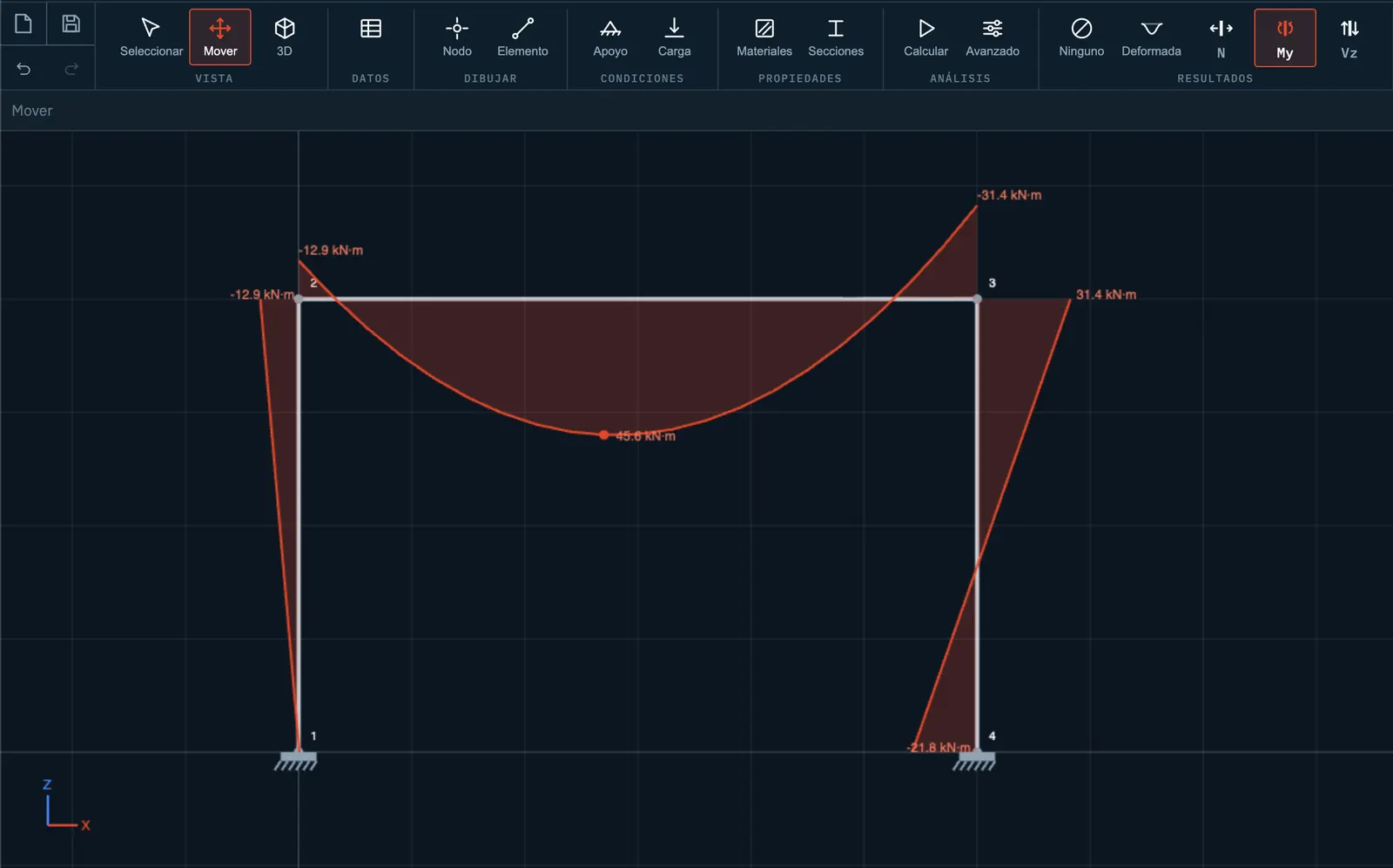
Stabileo in 2D: a solved portal frame with its bending-moment diagram, each ordinate labelled in kN·m.

2D — Characteristic diagrams

Axial force, bending moment and shear diagrams, and the deformed shape.
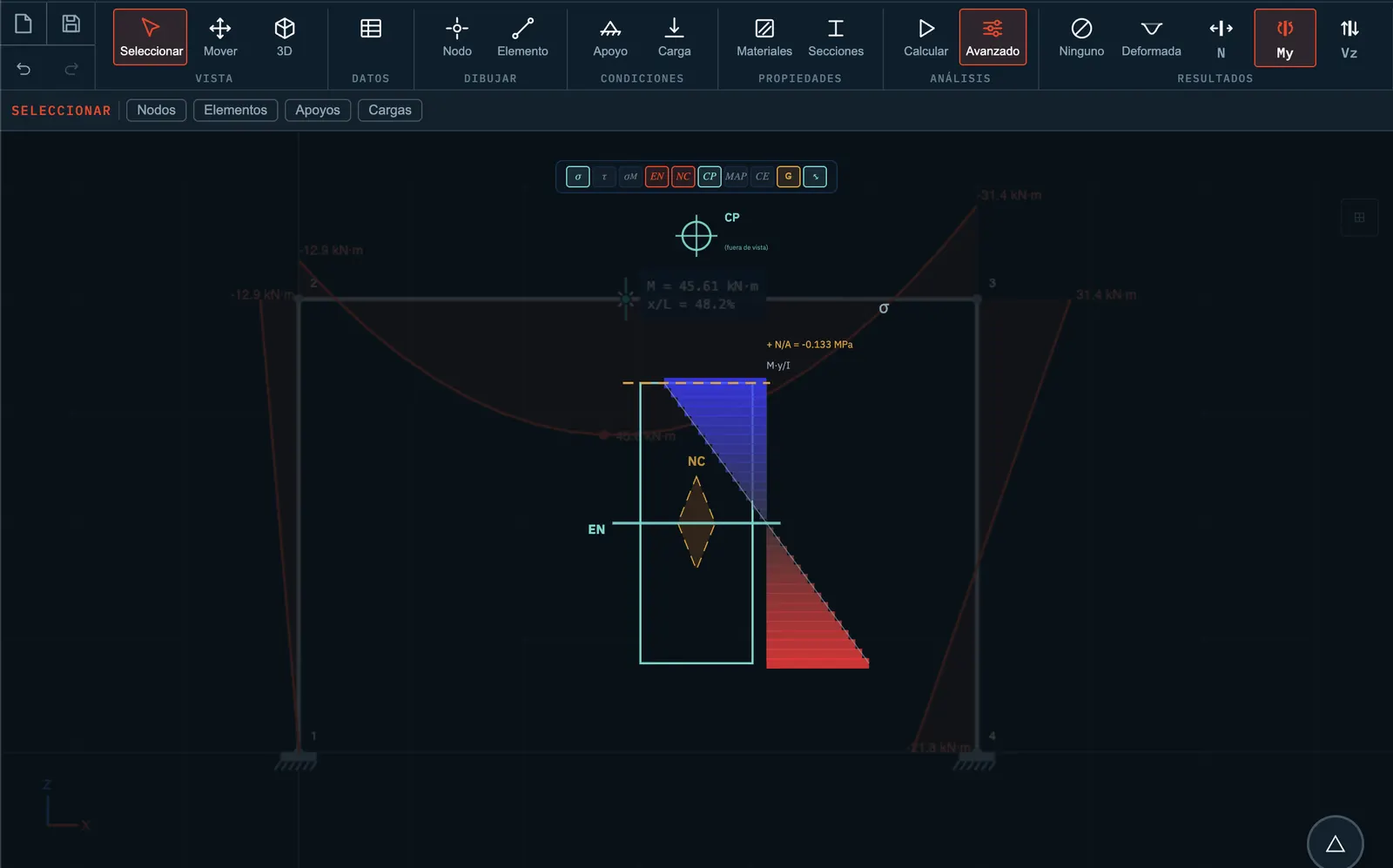
Stabileo in 2D: the stress state of the selected section drawn on the frame — the Navier distribution, the neutral axis, the core and the load application point.

Section stresses, member by member

Click anywhere on the structure and see the whole stress state, with the theory that produced it in view — worked through step by step for the centroid, the shear centre, the core and several more.
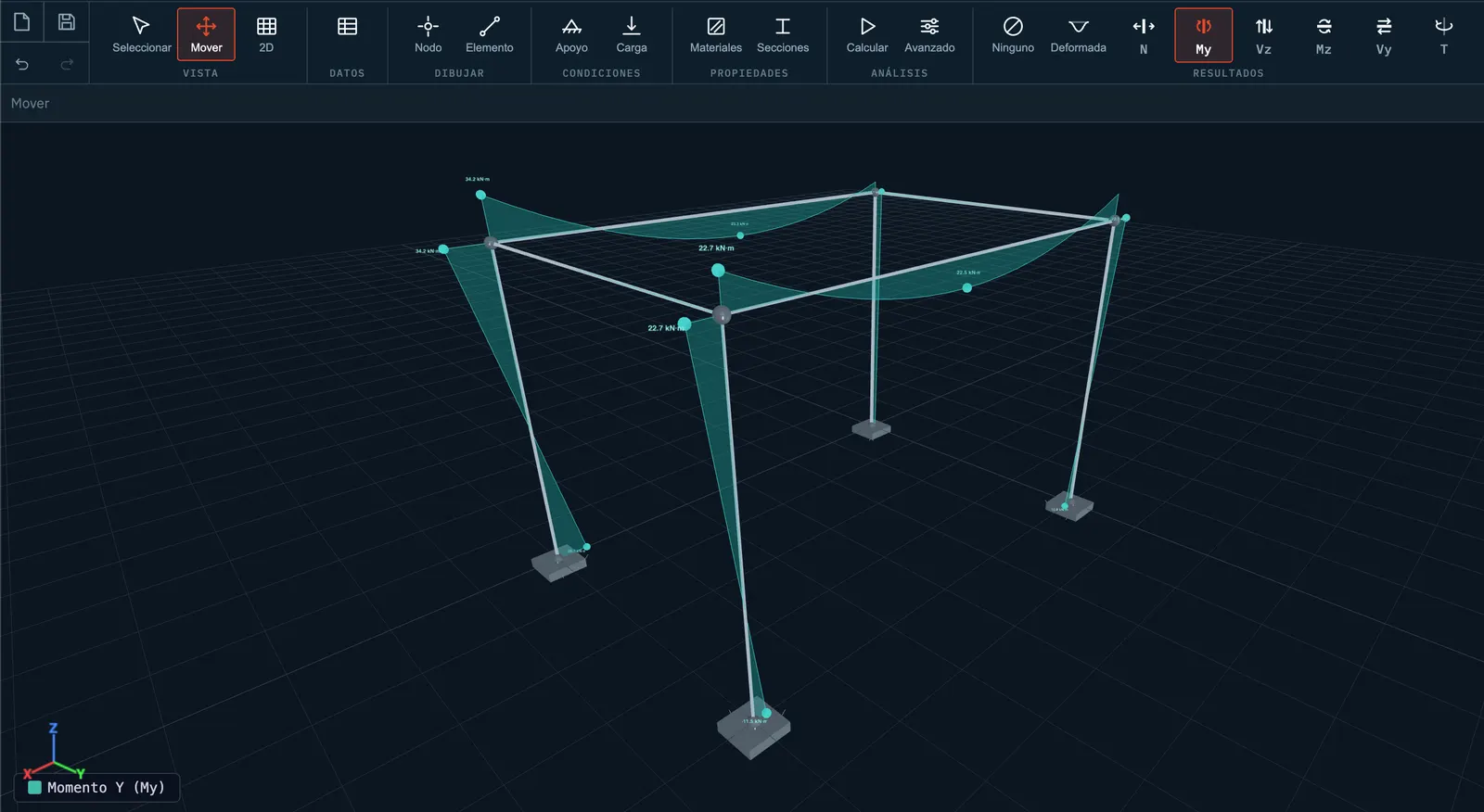
Stabileo in 3D: a space frame with the My diagram drawn as a surface along every member.

3D — six degrees of freedom per node

N, My, Vz, Mz, Vy and T diagrams, with the deformed shape in 3D.
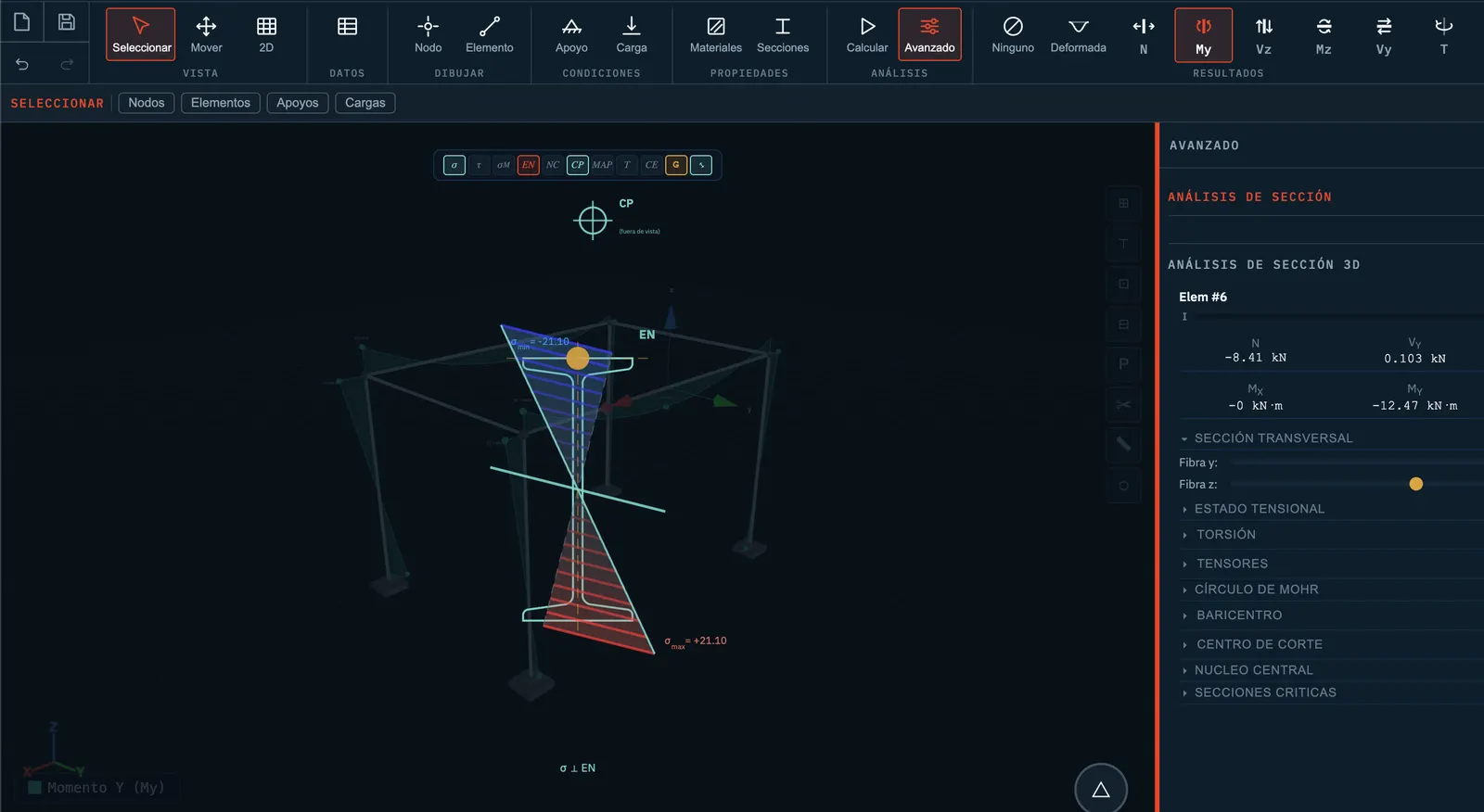
Stabileo in 3D: biaxial section stresses on a selected member, with the section-analysis panel open beside it.

Biaxial stresses in 3D

N/A + Mz·y/Iz + My·z/Iy with separate shear components, the oblique neutral axis, and torsion through three theories.
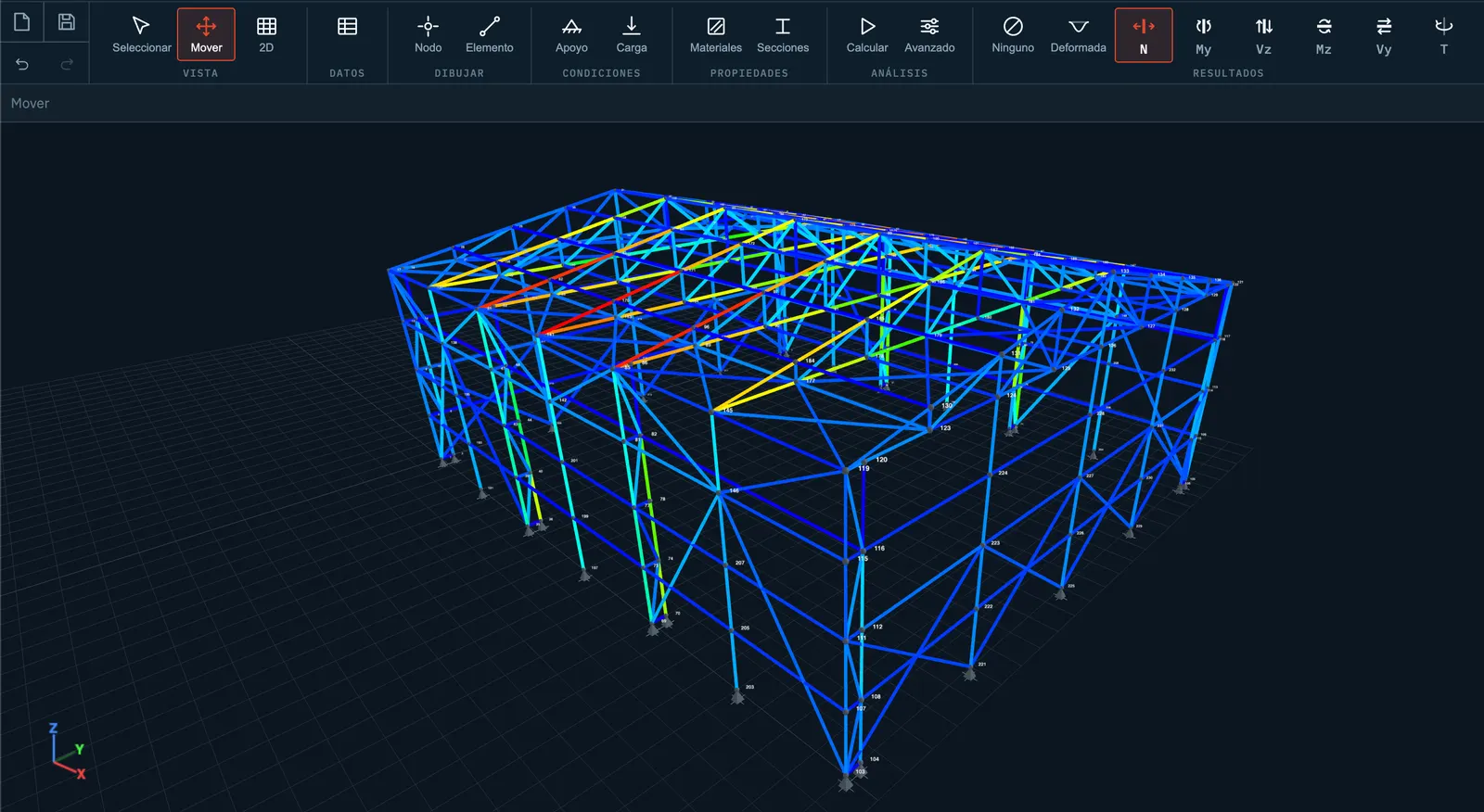
Stabileo in 3D: a complete industrial-shed truss, every one of its members coloured by axial force from blue to red.

And plenty more you can model

Thirty-seven models come in the examples menu, from a single beam to a whole industrial shed like this one. They are not a closed catalogue either: in Basic you model and solve whatever structure you want.

Basic is the most developed mode in Stabileo. Education and PRO build further workflows on the same structural-analysis foundation.

05 SOLVER CAPABILITIES

One engine, the whole span of the analysis.

The same engine serves all three modes. Deeper analyses belong to PRO, while some solver capabilities continue to expand.

LINEAR

  • Static
  • Second order
  • Buckling
  • Modal
  • Response spectrum
  • Time history
  • Harmonic
  • Moving loads

NONLINEAR

  • Corotational
  • Material nonlinearity
  • Plastic analysis
  • Construction stages
  • Contact / gap
  • Initial imperfections

ELEMENTS

  • Fiber beam-columns
  • MITC4 / MITC9 shells
  • SHB8-ANS solid-shells
  • Cables
  • Pre- and post-tensioning

TIME-DEPENDENT

  • Creep
  • Shrinkage
  • Staged construction
  • Accumulated load states

06 VALIDATION & EVIDENCE

Checked against the industry’s references.

Not self-certification: each analysis type is validated against published benchmarks and reference software.

VALIDATED AGAINST

  • NAFEMS
  • ANSYS
  • Code_Aster
  • SAP2000
  • OpenSees
  • Textbook solutions

5,655

Engine-coupled tests

Passing, 0 failures · measured at 6c3369d6 · 2026-08-01

55

Built-in example models

Ship with the app, from a cantilever to a stadium · 37 in the examples menu

69

GitHub stars

github.com/lambdaclass/stabileo

AGPL-3.0

Licence

Public repository, inspectable method

Sparse assembly, measured

22–89× faster factorisation on shell meshes, and 22× end to end. Sparse Cholesky with AMD ordering, measured in this repository against Stabileo’s own dense path, not against other vendors.

It runs on your machine

The solver is WebAssembly and runs inside your browser, so your model stays on your machine while it is analysed.

07 CODES & INTEROPERABILITY

Design and checking against the codes engineers work to.

Member checking already spans the main international codes. Code-based design, meaning proposing a design and generating reinforcement, is being built out one framework at a time.

Stabileo is built in Argentina, so CIRSOC comes first: it is the Argentine regulatory framework and the one this work answers to, and it is where code-based design is furthest along. The roadmap continues with the Eurocodes, and then with the United States codes.

  • CIRSOC 101

    2025

    AVAILABLE TODAY

    Permanent and imposed loads, and load combinations

    Generated from the model: self weight, partition allowance, the minimum imposed loads of Table 4.1, live-load reduction, and the seven strength combinations verbatim.

    Further load types will follow.

  • CIRSOC 102

    2025

    AVAILABLE TODAY

    Wind action

    Velocity pressure, exposure and terrain constants, topography, gust effect, enclosure classification and the wall and roof pressure coefficients, applied to the main wind-force resisting system.

    Non-rigid buildings and torsional load cases will be added.

  • CIRSOC 201

    2025

    PARTIAL · IN TESTING

    Reinforced-concrete design, and reinforcement generation

    The strongest coverage of any code here. Beams and columns are both verified and generated: flexure, shear, ties, bar regions, spacing, anchorage and lap lengths, each result carrying its clause. Slabs, walls and pad footings are designed too, reachable from the workflow, and their results are labelled provisional.

    Finishing development, and being tested against real projects.

  • CIRSOC 301

    2018

    PARTIAL

    Steel member checking

    A checker for steel members on the AISC 360 LRFD basis: tension, compression, flexure with lateral-torsional buckling, shear and combined actions.

    Code-based design in development.

  • INPRES-CIRSOC 103

    I 2018 · II 2005

    IN DEVELOPMENT

    Seismic action and seismic detailing

    Effective seismic weight and the static-method distribution of base shear up the height are already generated.

    Code-based seismic workflow in development.

INTERNATIONAL CODES · MEMBER CHECKING

The solver rates a member you designed against each of these today.

United States

  • AISC 360

    Steel

  • ACI 318

    Reinforced concrete

  • AISI S100

    Cold-formed steel

  • NDS · TMS 402

    Timber and masonry

Europe

  • EN 1993-1-1

    Eurocode · steel

  • EN 1992-1-1

    Eurocode · concrete

08 EDUCATION MODE

Education is being built on top of Basic.

IN DEVELOPMENT

A student-exercise layer built on the same structural-analysis engine. Teachers write exercises inside the app, hand them out as a link and get the answers back; what is still missing is the layer above that — the course.

WORKS TODAY

The student exercise layer

  • Seven predefined exercises, grouped into statics, strength and advanced.
  • The model loads and solves automatically. Correct answers come from the solver, not from a stored answer key.
  • Questions on reactions, on diagram values and shapes, on kinematics (isostatic or hyperstatic, and the degree) and on section data.
  • The student DRAWS the diagram — the ordinates, and the power of each span — and the drawing and the powers are marked separately against the solve. Shear, moment, axial and the deflected shape.
  • Answers are checked within a tolerance, with a hint when the sign or the order of magnitude is what went wrong. Results stay hidden while you work; whether they can be revealed at all is the teacher's decision.
  • A teacher writes an exercise in the app: draw the structure with the usual tools, then say what to ask about it. No code, no files to edit.
  • Handing out is a link or a file, and it opens a workspace built for the student. They hand back a file or a short code, and the teacher opens it as a marked table.

IN DEVELOPMENT

Teacher workflows in development

  • Assignments that group several exercises, with a due date and a class to hand them to.
  • More of the exercise under the teacher's control: which hints appear, when results become visible, how many attempts.
  • Student workflows for inspecting, repairing and building models, rather than only reading one.
  • A course-shaped progression: stability, reactions, displacements, diagrams, kinematics, section analysis.
  • Terminology help where a student meets a word for the first time.
  • Separate onboarding for teachers and for students.

What exists is the exercise and the round trip around it: a teacher writes one, hands it out, and reads the answers back. What does not exist is the course around THAT — assignments, a class list, attempts, a mark that lives anywhere. Stabileo stores nothing on a server, so an exercise and a submission travel as a link, a file or a code, the way work is already handed in. The step-by-step stiffness-method lessons are available as part of Basic.

The educational core is intended to stay free for educational use.

09 PRO MODE

PRO is in development, and it already runs complex calculations.

IN DEVELOPMENT

Finite-element analysis and complex models already work here, at the level you would expect from a professional package. What is still being polished is design to the regulations: the step many finite-element programs stop short of, handing you results and leaving the code check to you.

USABLE NOW

What PRO already does

  • Complex structural analysis: second order, buckling, modal, response spectrum, time history and plastic analysis.
  • Finite-element modelling and calculation, with plate, shell and solid-shell elements and their stress results.
  • A structured modelling panel, with its own tabs for nodes, elements, sections, materials, supports, loads, constraints, connections, results and diagnostics.
  • Automatic load generation to CIRSOC 101 and 102, with every value traceable to the clause it came from.
  • Reinforced-concrete design of beams and columns to CIRSOC 201-2025: it verifies a design and generates the reinforcement, and every result carries its clause and its validation maturity.
  • One-way and two-way slabs, walls and pad footings are designed too, from a real command in the workflow. These results are labelled provisional while they are tested against real projects.
  • Reinforcement drawings for five element families: beam and column elevations with their sections, footing plans with two sections, slab panel plans, and wall elevations and sections. They export as DXF and SVG.
  • A bar bending schedule with marks, diameters, shapes, quantities, cutting lengths measured along the physical bar including its hook arcs, mass, commercial stock bars and offcuts, plus a note wherever a bar exceeds stock length and needs a splice. It exports to XLSX.

IN DEVELOPMENT

What PRO is still missing

  • Complete, structure-wide reinforcement detailing.
  • Full floor-plan drawings: setting-out and reinforcement for a whole floor.
  • Code-verified reinforcement across every supported family, as today’s provisional results are promoted with published benchmarks.
  • Production-ready export of complete structural plans and schedules straight out of Stabileo.
  • Seismic workflows to INPRES-CIRSOC 103.
  • Torsion, beam-column joints, diaphragms and non-rectangular sections.
  • International code support, after CIRSOC.
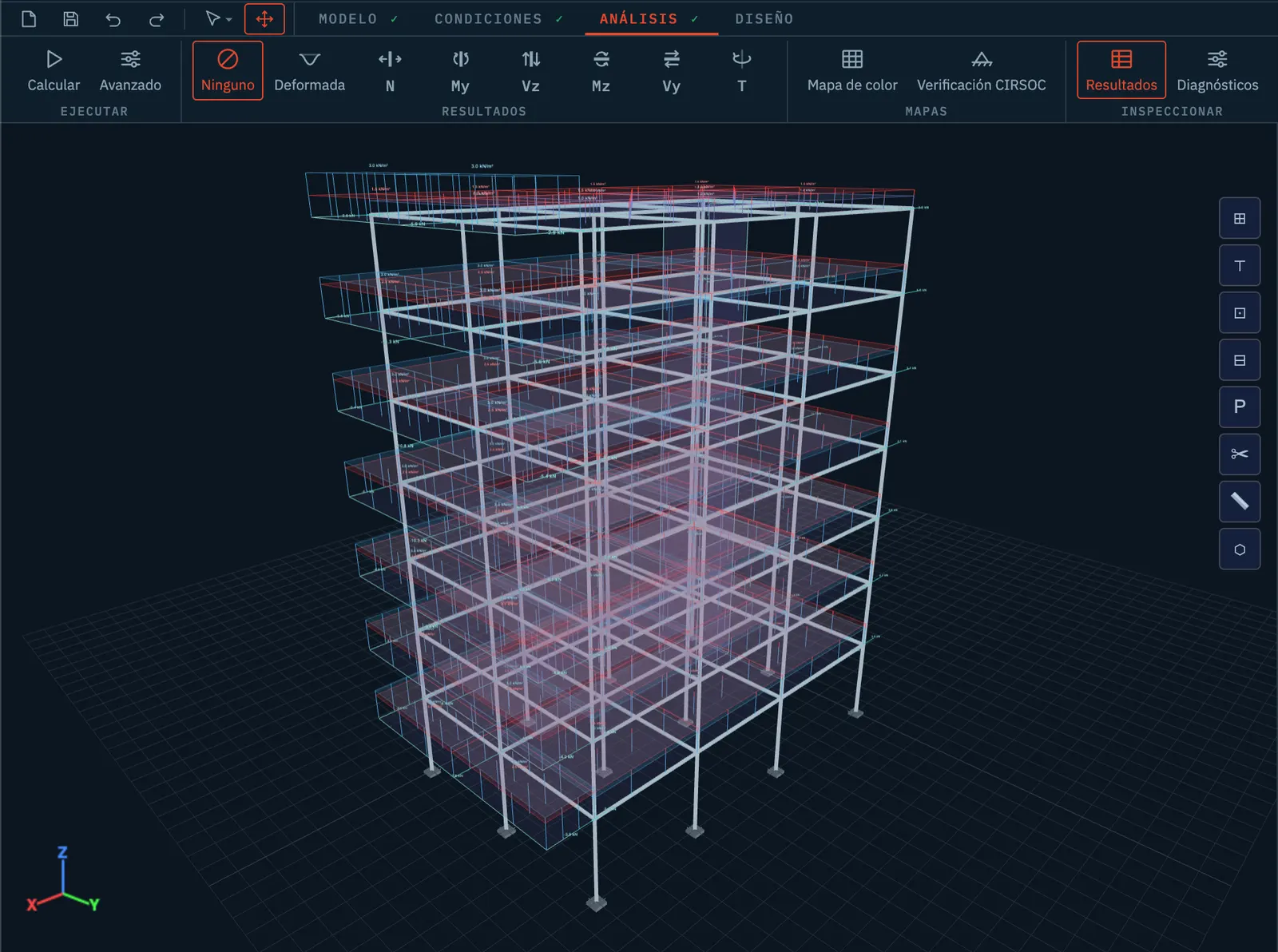
Stabileo in 3D showing a multi-storey reinforced-concrete building: columns, beams, slabs and the distributed loads on each floor, before running the analysis.

A whole building, before it is solved

Frames, slabs and their loads, modelled in the browser. Bars and plates together, which is what a real building is.
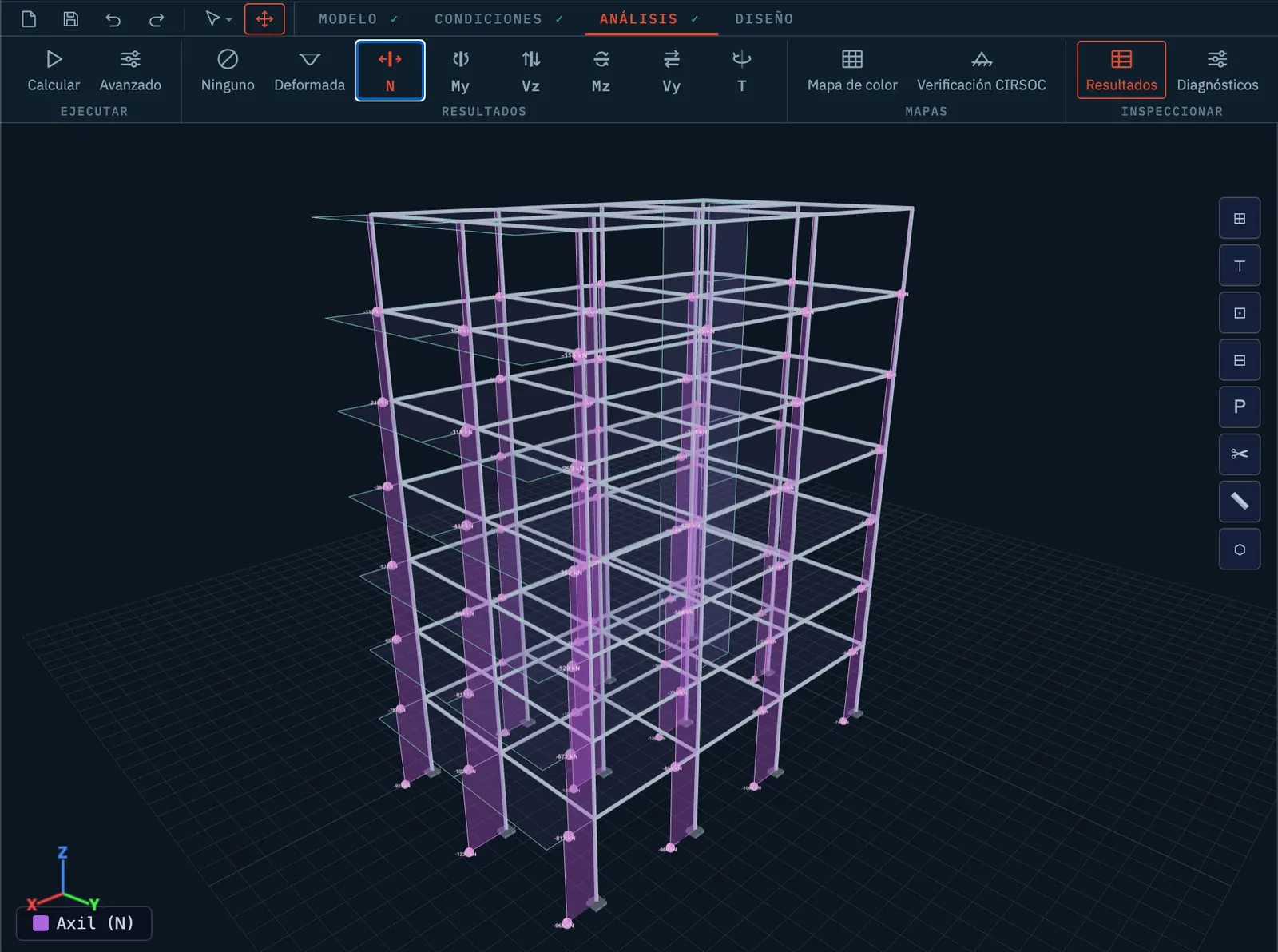
The same building after the analysis, with the axial-force diagram drawn along every column and its value labelled at each end.

The same building, solved

Axial force on every column, read straight off the model. Finite elements on a structure of this size already work.
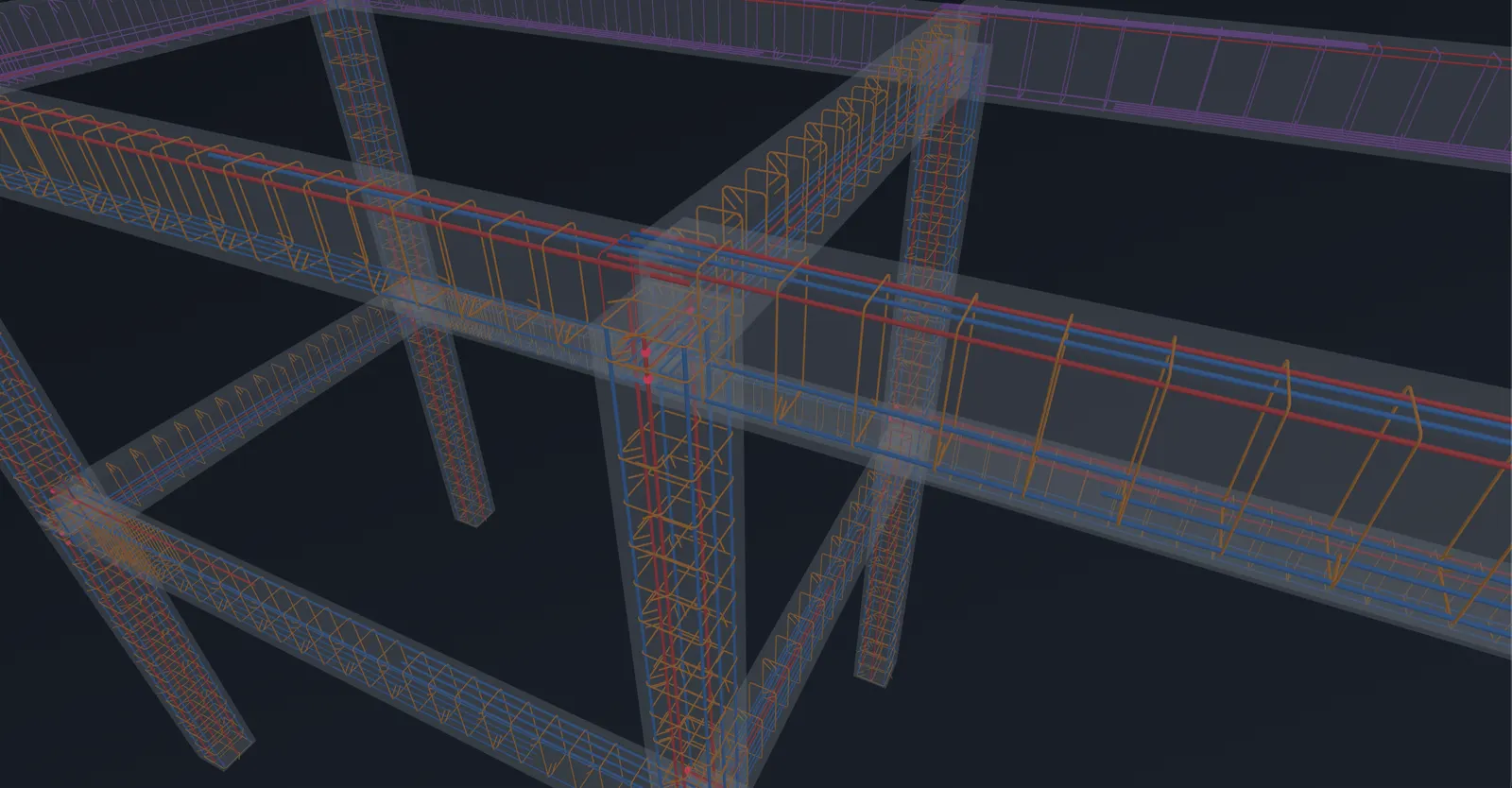
Close-up of a beam-column joint in 3D with its reinforcement visible: longitudinal bars in red and blue and stirrups in orange, inside translucent concrete.

Every bar of reinforcement, in 3D

Longitudinal bars and stirrups placed to CIRSOC 201, on the model rather than on a separate drawing. In development.

Real captures of the application, not renders. The reinforcement view is in development; everything else in this section states its own maturity above.

10 THE THESIS

AI does not design alone. It designs on a model that verifies it.

IN DEVELOPMENT

Generative AI produces the plausible, not the correct, and it cannot tell the two apart. What makes it dependable is a deterministic environment that validates it. The architecture that already works is always the same: a generator that explores and a verifier that guarantees.

GENERATOR

The AI proposes

It generates and edits the structured model: geometry, loads, sections, assumptions.

VERIFIER

The solver guarantees

The deterministic solver resolves the real mechanics. It is the source of truth, and there is no magic in the prompt.

CODE + COMPILER/TESTS

Coding agents work because something tells them whether it compiles and passes.

MATHEMATICS + LEAN

AlphaProof proves theorems because a formal verifier lets no error through.

STRUCTURES + STABILEO

AI can design because the solver validates every result against physics.

Stabileo AI is in active development. The agent routes already run in development and testing against a dedicated backend, on the same solver and the same numbers as everything else on this page. That backend is not part of the public site yet, so this section describes the direction rather than a service you can open today. The engineer still signs the work.

IN DEVELOPMENT

What the agent layer will do

  • Help create and modify structural models.
  • Interpret structural results.
  • Explain engineering concepts and what the solver returned.
  • Assist through a design workflow.
  • Support code-aware structural decisions.
  • Connect modelling, verification and documentation.

Stabileo’s solver is the compiler of the physical world.

11 PRODUCT STATUS

Where every capability stands today.

Everything that ships is marked as shipped, everything in progress carries its status, and none of it is required to use Stabileo.

AVAILABLE TODAY

Available today, at stabileo.com

  • 2D and 3D solver in the browser (Rust → WebAssembly), direct stiffness method
  • Live re-solving on every edit, available as an option
  • Linear, nonlinear, dynamic and advanced element analysis
  • Validated against NAFEMS, ANSYS, Code_Aster, SAP2000 and OpenSees
  • IFC (BIM) import, and DXF R12 import and export
  • Member checking against AISC 360, ACI 318, the Eurocodes, AISI S100, NDS and TMS 402
  • Reinforced-concrete design of beams and columns to CIRSOC 201-2025: verified and generated, not only rated
  • 55 example models ship with the app, 37 of them in the examples menu
  • Open source under AGPL-3.0, with no account and no licence key
PARTIAL

Partial

  • CIRSOC 102 wind: rigid buildings today, with non-rigid buildings and torsional load cases to follow
  • CIRSOC 301 steel: member checking today, code-based design in development
  • Slabs, walls and pad footings are designed and reachable in the workflow, and are being tested against real projects
  • Reinforcement drawings and bar schedules for beams, columns, footings, slabs and walls, exporting to DXF, SVG and XLSX; structure-wide plans in development
  • Results are labelled provisional until an independent external benchmark is on file
IN DEVELOPMENT

In development

  • Education mode — the exercise and the round trip around it run; the course above them is in development
  • PRO mode — advanced analysis and concrete design today, detailing and export expanding
  • Stabileo AI — the agent layer, in development on the same solver
  • INPRES-CIRSOC 103 seismic — load generation today, the full code workflow in development
ROADMAP

Roadmap / proposed

  • Broader CIRSOC coverage, seismic workflows first
  • Remote solving — an optional hosted service for models too large to solve locally
  • Stabileo AI credits — optional paid AI assistance
  • Cloud workspace — optional hosted storage and synchronisation
  • Process layers: optimisation, quantities and construction sequence

Free and open source

Stabileo is free software under AGPL-3.0, and the solver runs on your own machine. There is no price, no account and no licence key.

The core application is intended to stay free for educational use, and the Education and PRO layers grow on top of it.

The hosted services marked ROADMAP are still ahead, and using Stabileo will never depend on them.

Open Stabileo and model something.

No install, no account. The first model takes a minute.

View the source

BLOG

Access our blog

Longer pieces on how the solver works, what the code checks actually verify, and the decisions behind them. Written by the people who write the code, with the numbers computed rather than remembered.

|

View

Data

Draw

Conditions

Properties

Analyse

Results

Pan
Start by creating nodes (N)
Pos: (0.00, 0.00) m
Zoom: 50 px/m
Model: empty
Selection:
Grid: 1.00 m